Wispr Flow has completely changed the way I work. It began with their Mac app: you simply press a hotkey, speak naturally, and your words appear almost instantly with remarkable accuracy. It reminds me of Dragon NaturallySpeaking from the early 2000s—exciting but never quite delivering its full promise. Wispr Flow fulfills that promise and more.
Do you prefer to listen instead of read like me? Lucky for you I used NotebookLM to create a podcast out of this post. Listen below:
Historically, speech-to-text technology has been frustratingly unreliable, useful only in desperate situations. Wispr Flow has finally flipped that narrative.
Speak Faster Than You Type
The speed advantage is transformative. Most people type around 50 words per minute (WPM) with regular corrections and pauses. But speaking naturally can easily exceed 150 WPM. With Wispr Flow, your spoken ideas instantly become text, dramatically accelerating your workflow.
wispr flow sceenshot
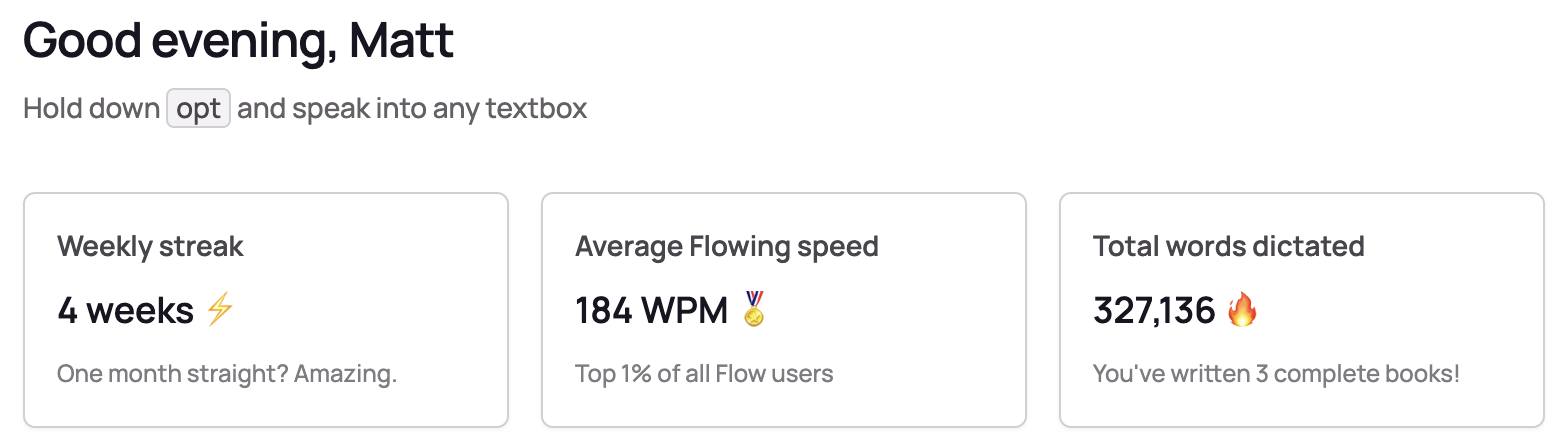
This advantage becomes even more significant when you use Wispr Flow directly with AI tools like ChatGPT or Claude Code. AI interfaces are forgiving—there’s no pressure to craft perfect sentences immediately, making speaking your ideas incredibly efficient. I’ve regularly achieved up to 170 WPM, letting AI organize my thoughts effortlessly into emails, messages, or notes.
Key Wispr Flow Features
- Smart Editing: Wispr Flow intuitively corrects minor mistakes mid-speech, formatting lists and correcting errors in real-time.
- Custom Dictionary: It learns your unique vocabulary, enhancing transcription accuracy over time.
- Cross-Platform:
- Initially launched on macOS
- Now available on Windows
- New iOS keyboard currently in TestFlight (far superior to Siri’s transcription)
The iOS keyboard is particularly impressive—significantly faster and more accurate than Siri, making it something you’ll actively want to use, rather than resorting to it only in dire hands-free situations.
Wispr Flow + “Vibe Coding” = Incredible Productivity
“Vibe coding” is a groundbreaking method of developing apps using AI assistants like ChatGPT, Claude, and Cursor. You describe your app naturally, and these AI tools generate fully functional code instantly. Combined with Wispr Flow’s rapid speech-to-text input, this approach allows you to build complex applications in minutes—tasks that previously took weeks or were simply impractical due to time constraints.
Ever since Claude 3.7 was released, I’ve been vibe-coding almost daily. I launched a dedicated site, silv.app , specifically for these experiments. The combination of Wispr Flow and AI-driven development has empowered me to accomplish in days what would have previously taken months or never happened at all.
Real-World Productivity Boost
In my everyday workflow, Wispr Flow helps me quickly draft Slack messages, detailed emails, or comprehensive documents. In just four weeks, I’ve dictated around 330,000 words, averaging over 170 WPM. While not every initial transcription is perfect, Flow delivers flawless spelling and surprisingly intuitive formatting. The productivity boost is unlike anything I’ve experienced.
The main adjustment is learning to press a hotkey and speak your ideas instead of typing. For me, that transition took only a week or two. Now, I can’t imagine returning to traditional typing. I strongly encourage you to try Wispr Flow , especially now that the iOS beta keyboard is available. Subscribers to Flow Pro gain early access—and it’s genuinely remarkable.
Behind-the-scenes note: I dictated this entire post using Wispr Flow in just 10 minutes, then refined it with Claude AI to maintain my voice while enhancing readability. This workflow perfectly showcases the productivity revolution I’m excited to share with you.
Use my referral link to try it: wisprflow.ai/r/MATT68